🌐Testnet Setup - Metamask
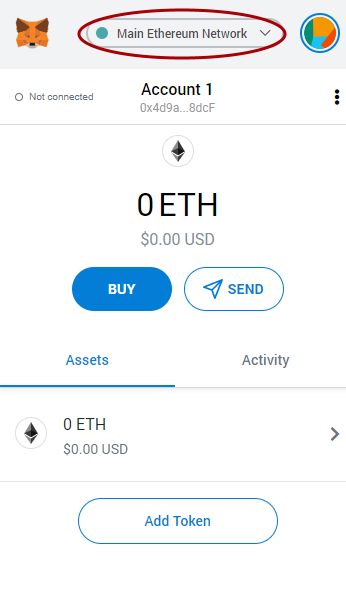
We need to set your wallet to connect to Binance Smart Chain, this is easy to do and easy to change between networks using the button near the top of the app.
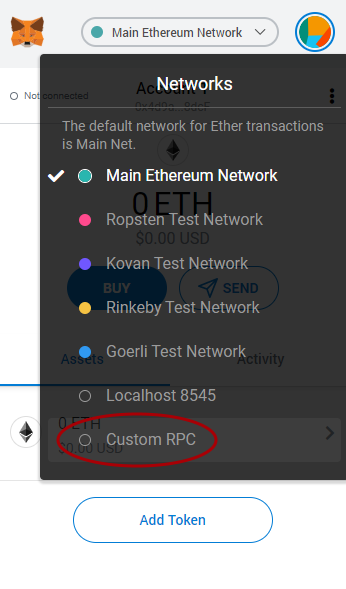
Click on “Custom RPC” if you have not previously added the BSC testnet information.
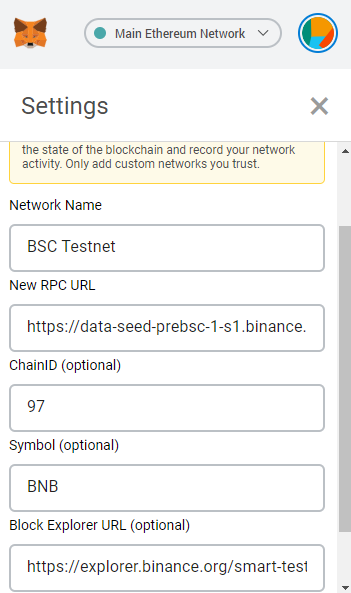
Enter in the BSC testnet details as follows:
Network Name: BSC Testnet
New RPC URL: https://data-seed-prebsc-1-s1.binance.org:8545
ChainID: 97
Symbol: BNB
Block Explorer URL: https://explorer.binance.org/smart-testnet
Then press “Save”
Congrats, now you have Binance Smart Chain Testnet all set up.
Last updated